Short answer: to put your song on Instagram Reels so that anyone can find it in the Audio search, release it through a music distributor that delivers to Meta’s music library (Facebook, Instagram and WhatsApp). Instagram does not let artists upload songs to its music library themselves. Once your distributor delivers the track and Meta processes it, your song shows up in Reels with your artist name, song title and cover art, and the same delivery covers Facebook Reels and Stories too.
Only need it in one Reel today? You can record or import your own audio into a Reel. It then shows as “Original audio” under your username, not under your song title, and it is not listed in the music search the way a released song is (Instagram Help: add your own audio).
At The Black Turn we have spent 6+ years working with 200K+ Indian artists, and “how do I put my song on Instagram?” is one of the questions we hear most. Usually the artist has already uploaded the song to a Reel from their camera roll, and now they can’t work out why nobody else can find it. This guide explains both routes, what Meta’s official pages actually say, why a song sometimes doesn’t show up, and how to give it a real chance to travel. If you are new to releasing music, read our complete guide to music distribution in India first.
How to Put Your Song on Instagram Reels: The Two Ways
There are only two ways your song can end up in a Reel. They look similar inside the app, but they work very differently.
Official Library Song vs Your Own Original Audio
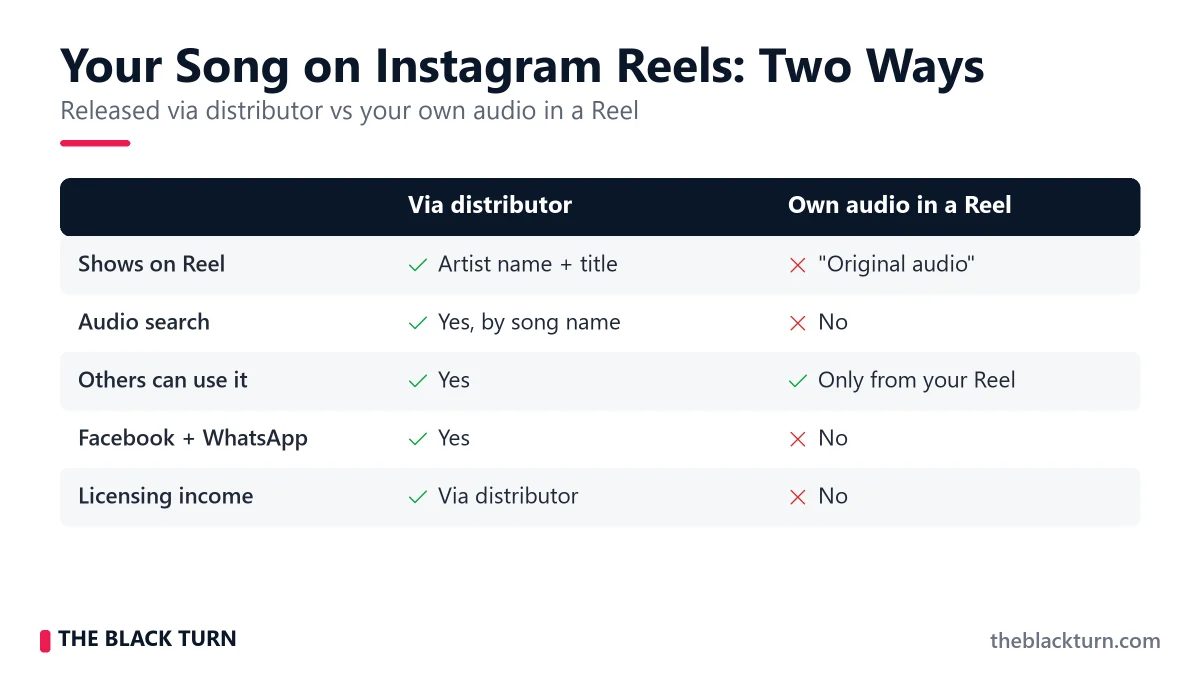
| Released via distributor (Meta music library) | Your own audio (recorded / imported in a Reel) | |
| What the Reel shows | Your artist name, song title and cover art | “Original audio” with your username |
| Found in Audio search | Yes, by song title or artist name | No, people reach it only from your Reel |
| Others can use it | Yes, anyone with access to the music library | Yes, from your Reel, if your account is public |
| Facebook and WhatsApp Status | Yes, same Meta music library | No |
| Earns through licensing | Yes, paid via your distributor | No |
| Same song on Spotify, JioSaavn etc. | Yes, if you release to all stores together | No connection |
Instagram’s own help page confirms the split: a Reel can use your own original audio, original audio from another creator, or audio from Instagram’s library, and licensed library audio is always credited with the artist and track name (Instagram Help: what audio you can use in your reel).
How Does Music Get on Instagram Reels?
Here is what happens behind the scenes after you hit “submit” at your distributor:
The Distribution Pipeline
- You upload your song to your music distributor (audio file, artwork, metadata).
- Your distributor delivers your song to Meta’s music platform. Meta is the parent company that owns Instagram, Facebook and WhatsApp.
- Meta processes your song: it reads the metadata, links the track to your artist name and adds it to the music library.
- Your song appears in Instagram’s Reels audio search and music sticker, and in Facebook’s music library.
- Any user can now search for your song by name or artist and use it in their Reels, Stories and posts.
- Your artist name and song title show on every Reel that uses it. Tapping the audio opens a page with all the Reels made on your song.
Licensed music in the library is there because of agreements between Meta and rights holders, and Instagram notes that a track can be muted in posts if those agreements change (Instagram Help). That’s why the route goes through a distributor: the distributor holds the agreement and delivers your track on your behalf.
Step-by-Step: How to Get Your Song on Instagram Reels & Facebook
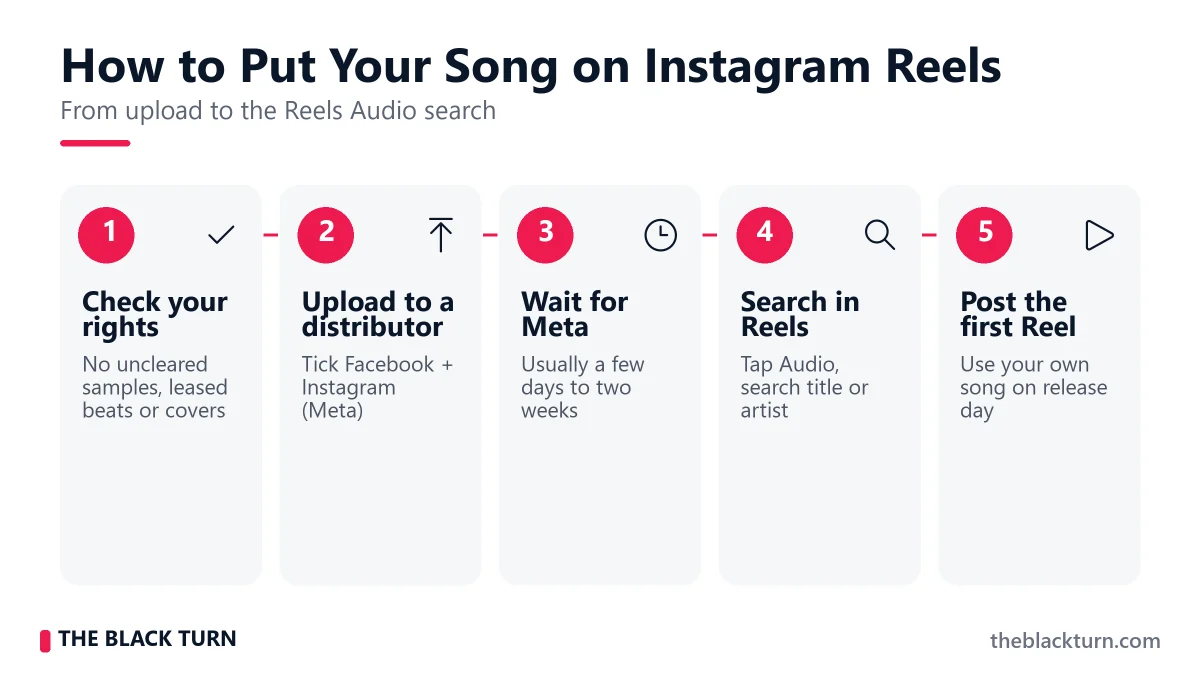
Step 1: Make Sure the Song Is Fully Yours
Before you upload, check the things that most often get a song blocked from Meta’s library:
- You own the full recording and composition, or have written permission from everyone involved (producer, lyricist, featured singer).
- No uncleared samples and no beat that you only leased without the right to release it commercially.
- Covers and remixes of other people’s songs need proper licences, and are often not accepted for the Meta library even when stores accept them.
- Consistent metadata: the same artist name spelling on every release, a clean song title (no “official video”, no hashtags), and correct language.
Step 2: Choose a Distributor That Delivers to Facebook/Instagram
Check that your distributor delivers to Meta and whether it charges anything extra for it. With The Black Turn, delivery to the Facebook, Instagram and WhatsApp music library is included free, with no per-song fee, alongside Spotify, Apple Music, JioSaavn, Gaana, YouTube Music, Amazon Music and 150+ other stores in one upload. See the music distribution page for what is covered.
When selecting a distributor, verify:
- Facebook/Instagram delivery included: ask directly whether there is any extra fee for Meta.
- All stores in the same release: when a Reel takes off, listeners search for the full song on Spotify, JioSaavn and Apple Music. Be live there already.
- YouTube Content ID: Reels often get re-uploaded to YouTube. Content ID claims those uploads for you.
- Clear royalty share: check what percentage of Meta income you keep and how often you get paid.
Step 3: Prepare Your Song for Reels
Users pick a short section of your song for their Reel, usually 15–30 seconds. So your song needs a hook that stands out quickly: a memorable melody, a catchy phrase, a beat drop, or a relatable lyric.
- The hook test: Play the first 30 seconds of your song to someone who has never heard it. If they cannot hum or remember any part of it, the hook is not strong enough for Reels.
- Think in clips: Before releasing, mark 2–3 sections that would work as 15–30 second clips. These are the parts creators will reach for.
- Phone-speaker check: Most Reels are watched on a phone without headphones. Listen to your master on a phone speaker before you upload. Upload a WAV file, not an MP3.
- Avoid long intros: A 40-second instrumental intro rarely gets picked. Make sure the strongest moment comes early.
Step 4: Upload and Select Facebook/Instagram
Log in to your distributor’s dashboard, start a new release, and upload your audio and artwork as you would for any release. Fill in all metadata such as song title, artist name, genre, language and credits.
When selecting platforms, make sure Facebook and Instagram are ticked. Depending on the distributor they are listed separately or grouped under “Meta”. Set your release date 2–3 weeks ahead so every store, including Meta, is ready on the day.
Step 5: Wait for Meta Processing
Meta does not publish a fixed processing time. In our experience a song usually appears in the Instagram and Facebook library within a few days to two weeks after delivery, and it is often live on Spotify or JioSaavn before it shows on Instagram. That is normal; each platform runs its own processing.
Step 6: Check Your Song Is Live and Use It Yourself
These are Instagram’s own steps for adding music to a Reel (Instagram: how to add music to Reels):
- Open Instagram, go to the camera and choose Reels.
- Tap the Audio button while editing.
- Search for your song by title or artist name. It should appear with your cover art and artist name.
- Choose the section by moving the timeline bar, then tap Done.
- Tap Next, add a caption and Share.
Do the same check on Facebook by creating a new Reel and searching for your song in its music library.
Song Not Showing on Instagram Reels? Check These First
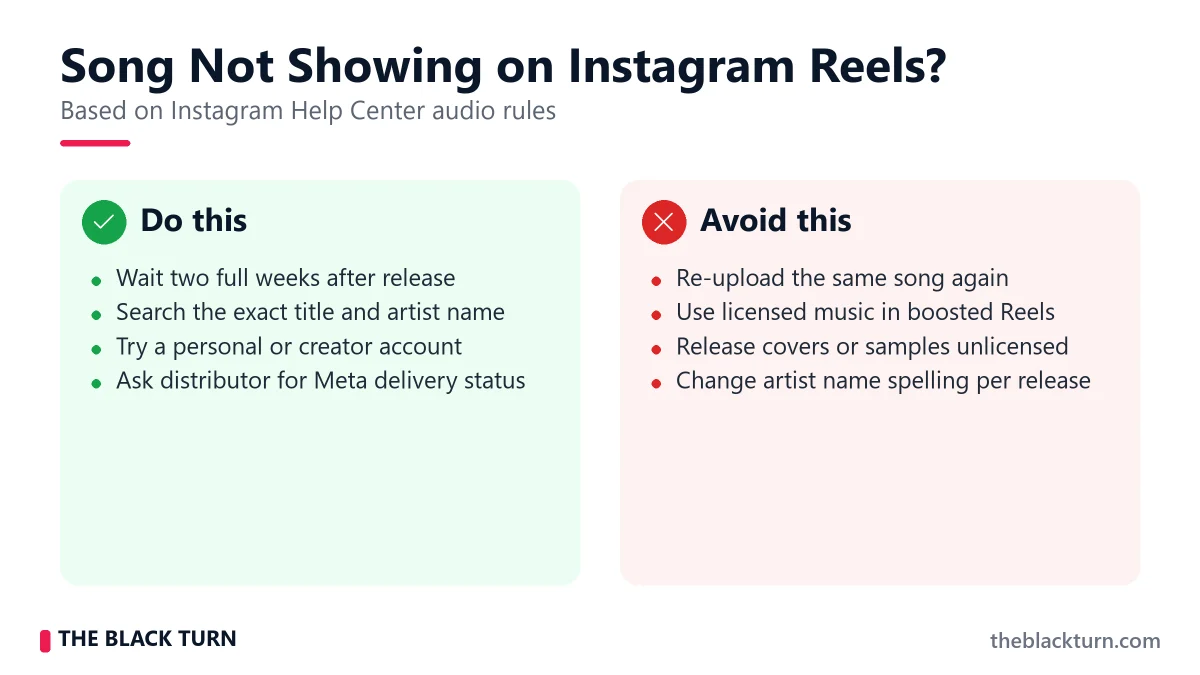
When artists write to us that their song is “missing on Instagram”, it is almost always one of these:
- Still processing: give it the full two weeks after the release went live before you worry.
- Meta was not selected in the release, or the distributor doesn’t deliver to Meta at all.
- Spelling: search for the exact title and artist name as you entered them. A small difference (“Preet” vs “Preett”) hides the song.
- Rights problem: a sample, leased beat, cover or a clash with another rights owner can keep a song out of the library.
- Account type or region: Instagram says the licensed music library may not be available for some account types or in some countries or regions (Instagram Help: problems with audio). If you search from a business profile, try a personal or creator account too.
- Boosted Reels: Reels boosted as ads can’t use licensed music. Instagram suggests original audio or royalty-free tracks from Meta’s Sound Collection instead.
If none of these explain it, contact your distributor with the release name and UPC, and ask them to confirm the Meta delivery status.
Do You Earn Money When Someone Uses Your Song in a Reel?
Yes, but not as a fixed amount per Reel. Meta pays for library music through its licensing agreements with rights holders. Your distributor receives that money and passes your share on to you. There is no official public per-Reel rate, so be careful with any blog or video that promises “X rupees per 1,000 Reels”. The amount depends on how the track is used, the country and the agreements behind it.
How to read it yourself: in your distributor’s royalty report, look for lines marked Facebook, Instagram or Meta, separate from Spotify or YouTube. Compare those lines month by month with how many Reels the audio page shows. That tells you more about your own song than any average figure online. With The Black Turn you keep 95% of all income, Meta included, paid quarterly. For the full picture of how Meta income works, read our guide to Instagram and Facebook music monetization.
The Bigger Money Is Usually Off Instagram
- Someone uses your song in a Reel, and their followers hear it.
- More creators use the same sound, and the audio page starts filling up.
- Listeners want the full song. They tap the audio, see your name and title, and search for it.
- They stream it on Spotify, JioSaavn, Apple Music or YouTube Music, and each of those streams earns royalties.
- Saves and playlist adds tell the streaming apps’ algorithms that people like the song, which can bring more streams.
Facebook Reels and WhatsApp Status: Same Song, More Places
Facebook Reels
The same delivery puts your song in Facebook’s music library. Many Indian artists focus only on Instagram and forget Facebook, even though your Facebook friends and followers are often a different crowd from your Instagram followers. You can share your Instagram Reels to Facebook as well, but also try Facebook-specific posts: slightly more context in the caption, and content that fits the people who follow you there.
WhatsApp Status
WhatsApp added music to Status updates on 28 March 2025. You tap the music note at the top of the Status screen, search for a song, and pick the part you want: up to 15 seconds on a photo and up to 60 seconds on a video (WhatsApp Blog). Because The Black Turn delivers to the Facebook, Instagram and WhatsApp music library together, fans can put your song on their Status once it is in the library. Status is seen by people’s own contacts, so ask friends and fans to use it there on release week. Our step-by-step guide covers the details: WhatsApp Status par apna gaana kaise laaye.
How to Make Your Song Go Viral on Instagram Reels
Distribution puts your song in the library. Getting people to use it takes deliberate work. Nobody can promise a viral song, but these habits give it a fair chance:
1. Create the First Wave of Reels Yourself
Do not wait for others to discover your sound. Create 5-10 Reels using your own song in the first days after it appears in the library. Each one should show a different way to use the audio:
- A dance or transition Reel using the hook
- A lip-sync Reel with expressive performance
- A relatable/funny skit that uses the lyrics or mood
- A “before and after” or transformation Reel with your song as background
- A behind-the-scenes studio clip showing the song being made
The goal is to show other creators how they can use your sound. When they see a format that works, they copy it with their own twist. That is how trends start. For more on using your own track as a Reels sound, see our Hindi guide: Instagram Reels pe apna original sound kaise lagaye.
2. Seed the Sound with Smaller Creators
Reach out to 10-20 creators with 5K-50K followers in your genre or niche and ask them to make a Reel on your song. Smaller creators are easier to reach and often have a closely engaged audience. If you pay anyone, agree on it clearly in writing, and make sure they use the library version of your song, not a screen recording.
Match the song to the creator. A Punjabi track fits Punjabi creators; a motivational song fits fitness or self-improvement pages. The fit between your song’s mood and the creator’s niche matters more than follower count.
3. Create a Challenge or Trend
Sounds that spread on Reels are usually tied to a specific format: a dance step, a transition, a meme or a relatable situation. Look at your song:
- Can a specific lyric be used as a relatable caption situation?
- Is there a beat drop that suits a transition?
- Can you create a simple dance move for the chorus?
- Is there a line that works as a comedic punchline?
Define the format first, make a few example Reels, and then push it out through your network and creators.
4. Use WhatsApp to Kickstart the Chain
In India, WhatsApp is where your first listeners are. Share your Reels in WhatsApp groups and broadcast lists, and ask friends, family and fans to watch, share, put the song on their Status and make their own Reels. Early engagement from real people gives each Reel a better start.
5. Post When Your Followers Are Online
Skip generic “best time to post” charts. Open your Instagram Insights (professional dashboard) and check when your own followers are most active, then post your key Reels in that window.
6. Consistency Over One-Hit Attempts
Do not post one Reel and give up. Post 3-5 Reels per week on your song for at least 4-6 weeks after release. The first Reel may not get pushed to a wide audience, but the fifth or tenth one might.
7 Mistakes to Avoid with Instagram Reels Music
1. Not Distributing Properly
Adding your song from your camera roll gives you “original audio” under your username, not a song people can search for. Release it through a distributor to get it into Instagram’s official music library.
2. Uploading Only to Instagram
When a Reel takes off, listeners search for your song on Spotify, JioSaavn and Apple Music. If you are not there, you lose those streams. Always distribute to all platforms at the same time.
3. Weak First 15 Seconds
If your song starts with a slow, unremarkable intro, creators will skip it. Make sure your hook, chorus or strongest moment comes early, or release a short edit where it does.
4. No Promotion After Distribution
Distribution gets your song into the library, but it does not create Reels. You need to make the first wave yourself and get creators on board. Waiting for strangers to find your song among millions of tracks is not a plan.
5. Ignoring Facebook Reels
Your Facebook audience is often not the same as your Instagram audience. The song is already in its library, so share your Reels there too and test Facebook-specific posts.
6. Not Using Caller Tune Distribution
Reels help people find you online, while caller tune distribution works offline. When fans set your song as their Jio, Airtel, Vi or BSNL caller tune, everyone who calls them hears it. Reels and caller tunes work well together.
7. Giving Up Too Soon
A song rarely takes off with the first post. Commit to at least 4-6 weeks of steady posting and creator outreach, several Reels a week, before you judge the results.
Instagram Reels vs YouTube Shorts for Indian Artists
TikTok is still not available in India: the government said in August 2025 that no order had been issued to lift the 2020 ban (All India Radio News). For Indian artists, the real short-video pair is Instagram Reels and YouTube Shorts.
| Factor | Instagram Reels | YouTube Shorts |
| How your song gets in | Distributor delivery to Meta’s music library | Distributor delivery to YouTube Music, plus Content ID |
| Also covers | Facebook Reels and Stories, WhatsApp Status | Re-uploads of your song on YouTube |
| Where fans go next | Your audio page, profile, streaming apps | Your channel and the full song on YouTube |
| Best for | Trends, dance, lip-sync, Stories | Building a channel that also earns from long videos |
It is not either/or. Release to both in the same upload. One release can cover Instagram, Facebook, YouTube Music, Spotify, JioSaavn and the rest, with Content ID protecting your song when Reels get re-uploaded to YouTube.
Frequently Asked Questions
How do I put my song on Instagram Reels?
Release the song through a music distributor that delivers to Meta (Facebook and Instagram). After delivery and Meta’s processing, the song appears in the Reels Audio search under your artist name and song title, and anyone can use it. You cannot upload it to Instagram’s music library yourself.
Can I directly upload my song to Instagram as an original sound?
You can record or import your own audio into a Reel, and it shows as “Original audio” under your username. Other people can reuse it from your Reel if your account is public, but it won’t be listed in music search under your song title. To get that, the song must be delivered by a distributor to Meta’s music library.
How long does it take for my song to appear on Instagram Reels?
Meta does not publish a fixed timeline. In our experience it usually takes a few days to two weeks after your distributor delivers the song. Set your release date 2–3 weeks ahead so Instagram is ready on release day.
Is it free to put my song on Instagram and Facebook?
Instagram itself does not charge, but you need a distributor to get into the music library. Check whether your distributor charges anything extra for Meta delivery. The Black Turn includes the Facebook, Instagram and WhatsApp music library in every release at no per-song fee.
Do I earn money when someone uses my song in their Instagram Reel?
Yes, through Meta’s licensing agreements, paid to you via your distributor. There is no fixed public rate per Reel, so check the Facebook/Instagram lines in your royalty report. The bigger benefit is often the streams on Spotify, JioSaavn and YouTube that a popular Reel brings.
Why can I not find my song on Instagram after distribution?
The usual reasons: the song is still processing, Facebook/Instagram was not selected, the title or artist name is spelled differently from your search, there is a rights issue (sample, leased beat, cover), or the licensed music library is not available for your account type or region. Ask your distributor to confirm the Meta delivery status.
Does my song appear on both Facebook and Instagram?
Yes. One delivery to Meta’s music library covers Instagram (Reels, Stories, posts) and Facebook (Reels, Stories, videos). Songs in the library can also be added to WhatsApp Status.
Can I add my song to my WhatsApp Status?
Yes, once it is in Meta’s music library. WhatsApp launched Status music on 28 March 2025: tap the music note, search the song and choose up to 15 seconds for a photo or up to 60 seconds for a video.
Can I distribute just to Instagram without other platforms?
There is little benefit in releasing only to Instagram. When a Reel works, people look for the full song on streaming apps. Release to Instagram, Facebook, Spotify, Apple Music, JioSaavn and other stores in the same upload.
What happens if someone uses my song without credit?
If they use the library version, Instagram shows your song name and artist name on the Reel automatically. If someone uploads your song as their own audio, you can report it to Instagram as a copyright issue, and re-uploads on YouTube can be claimed through YouTube Content ID.
How many seconds of my song can be used in a Reel?
Reels can now be much longer than the old 90-second limit, and users can pick any part of your song. In practice most creators use a 15–30 second section, usually the chorus or hook, so a strong, quick hook matters most.
Get Your Song on Instagram Reels the Right Way
In early 2022, a peanut seller from West Bengal, Bhuban Badyakar, became one of India’s biggest internet stories. A video of him singing “Kacha Badam” to attract customers spread across Instagram, YouTube and Facebook. By February 2022 he was performing the song at a pub in Kolkata (The Quint). By March 2022, two released remix versions had each crossed a billion YouTube views (Onmanorama).
The lesson for artists: the moment came from a phone clip, but the reach piled up on properly released tracks with a label and metadata behind them. A Reel can start the fire anywhere. What decides who gets the credit, the searches and the royalties is whether a released, correctly labelled version of the song is in the library when people come looking.
So release first, then post. If you want a music distributor in India that delivers to Instagram, Facebook and WhatsApp with no per-song fee, plus Spotify, JioSaavn and 150+ stores, with 95% lifetime royalty and free YouTube Content ID, check our pricing before your next release.
 Jyoti Singh – Independent artist (32) who has worked at several music distribution companies and has released music through distributors – so these guides come from both sides of a release.