JioSaavn is one of India’s biggest homegrown music streaming apps. For any artist creating music in Hindi, Punjabi, Tamil, Telugu, Bengali, Bhojpuri, or any Indian language, JioSaavn is not just another platform, it is where a big part of your core audience listens. This guide shows you how to get your song on JioSaavn as an Independent Artist or Label in 2026.
But here is what most new artists do not know: you cannot upload your song directly to JioSaavn. Unlike YouTube or SoundCloud, JioSaavn only takes music from labels and music distributors. Its own artist site says it plainly: “At the moment, we do not let artists upload their content on our platform.” So you need a distributor to get your music on JioSaavn.
In this guide, we will cover everything you need to know about getting your song on JioSaavn as an independent artist in India, from choosing a distributor to going live, claiming your artist profile, earning royalties, and getting your song as a JioTune (Jio caller tune). If you are new to distribution entirely, start with our complete guide to music distribution in India first.
What Is JioSaavn?
JioSaavn (earlier called just “Saavn”) is a music and podcast streaming app owned by Reliance Jio. It has a free, ad-supported tier and a paid JioSaavn Pro tier, and it is deeply linked with Jio’s caller tune service, JioTunes. If you are searching “how to distribute music to Saavn”, it is the same platform and the same process: Saavn became JioSaavn, and releases still reach it only through a label or distributor.
Why JioSaavn Matters for Indian Artists
Before we get into the how, let us understand the why. JioSaavn has a few advantages that make it essential for Indian artists:
A Big, India-Focused Listener Base
Indian listeners have moved to streaming apps in a big way. The 2026 EY–IMI survey of 15,373 smartphone users found that 60% of smartphone users listened to music on streaming services (DSPs), and JioSaavn is one of the main Indian ones. Its listeners are people actively searching for Hindi, Punjabi, and regional music. Unlike Spotify, where Indian content competes with global artists, JioSaavn’s audience is India-first.
JioTune (Caller Tune) Integration
This is JioSaavn’s biggest advantage. JioSaavn is directly connected to JioTunes, the caller tune service for Jio users. According to Jio’s own help article, a Jio user can set a JioTune through the MyJio app, the JioSaavn app, or by dialling 56789. When your distributor delivers your song with the caller tune (CRBT) option, fans can set it as their JioTune. This is a revenue stream you usually cannot access through international distributors alone. Learn more about caller tune distribution in India.
Regional Music Focus
JioSaavn carries large regional catalogues. Whether you make Bhojpuri, Rajasthani, Haryanvi, Marathi, or Assamese music, the app lets listeners browse by language, with language-wise playlists and charts. Listeners in Tier 2 and Tier 3 cities, who make up a huge part of India’s music audience, use JioSaavn a lot.
Editorial Playlists and Featured Content
JioSaavn’s editorial team curates playlists by language, mood and genre. Through JioSaavn for Artists (ArtistOne), verified artists can pitch songs to JioSaavn’s editors for playlist consideration. Competition for regional-language playlists is usually lower than for Spotify’s global playlists.
Lyrics
JioSaavn shows lyrics on many songs, which keeps listeners on your track longer. Submit lyrics through your distributor if they support it.
JioSaavn in the USA and Outside India
JioSaavn is not India-only. The JioSaavn app’s listing on the US App Store says content is served in the United States and Canada, while its English (international) catalogue is currently available in India. For Indian artists, that means the Indian diaspora in the USA and Canada can stream your Hindi, Punjabi or Tamil song on JioSaavn. You do not need a separate “JioSaavn USA” release: a normal distributor delivery covers it, and your royalty report will show streams by country. JioTunes, of course, work only on Jio numbers in India.
What You Need to Upload on JioSaavn
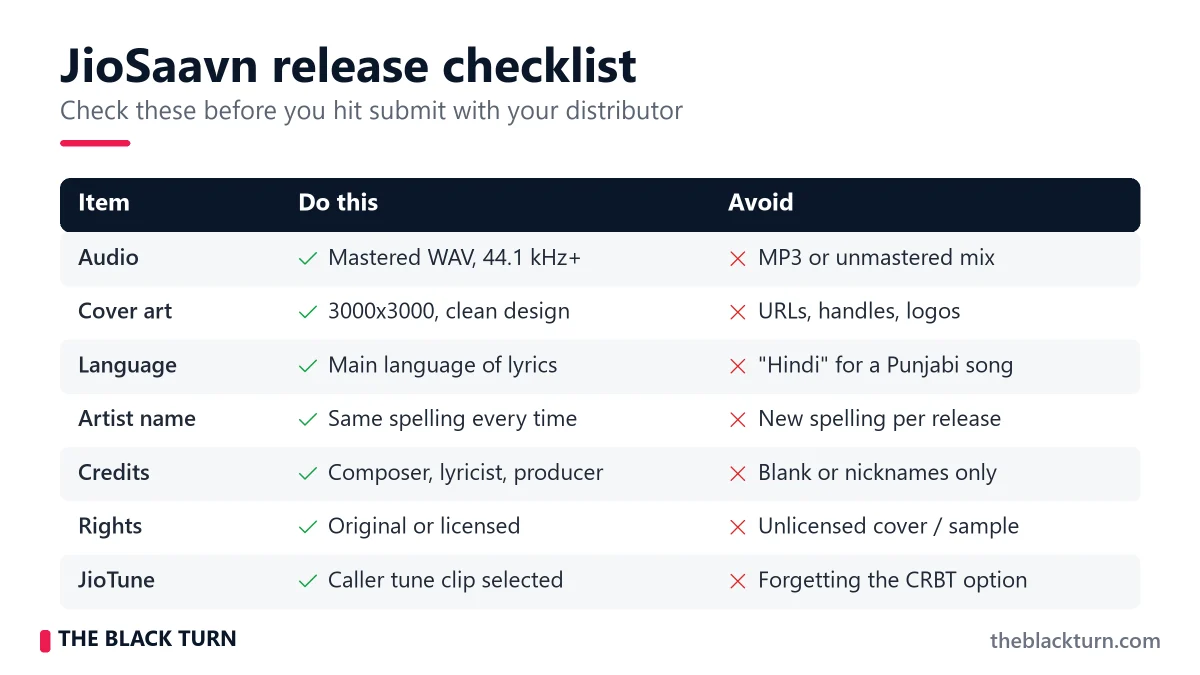
The requirements for JioSaavn are similar to other major platforms, but with some India-specific points. Your distributor’s exact specs may differ slightly, so check their upload guide too:
Audio File Requirements
| Specification | Required | Recommended |
| Format | WAV or FLAC | WAV (16-bit or 24-bit) |
| Sample Rate | 44.1kHz minimum | 44.1kHz or 48kHz |
| Bit Depth | 16-bit minimum | 24-bit for best quality |
| Loudness | No specific requirement | Around -14 LUFS (common streaming target) |
| MP3 Accepted? | Through some distributors | Avoid — always use WAV |
Cover Artwork Requirements
- Dimensions: 3000×3000 pixels (square)
- Format: JPG or PNG, high resolution
- Do NOT include: Website URLs, social media handles, phone numbers, platform logos, pricing text, blurry or pixelated content
- Tip: JioSaavn shows artwork in many sizes on mobile and desktop. Make sure any text on it is readable even as a small thumbnail
Metadata Checklist
Metadata accuracy matters a lot for Indian content on JioSaavn. Here is what you need:
- Song Title : Exact spelling. For Hindi songs written in English script, be consistent (e.g., decide between “Tere Bina” and “Tere Binaa” and stick with it)
- Artist Name : Primary and featured artists, consistently spelled across all releases
- Album/Single Name : Even singles need a release name
- Language : Critical on JioSaavn. Select the correct language: Hindi, Punjabi, Tamil, Telugu, Bengali, Marathi, Bhojpuri, English, etc. Wrong language selection means your song appears in the wrong section and misses your target audience
- Genre : Primary and secondary. Indian genres like Bollywood, Devotional, Ghazal, Sufi and Indian Classical are common on JioSaavn
- Composer, Lyricist, Producer : Full and accurate credits
- Release Date : Set it 2–3 weeks in the future so there is time to pitch for playlists
- Lyrics : Optional but recommended. Submit through your distributor if supported
Language is critical: Selecting “Hindi” when your song is actually Punjabi means it will not show up in Punjabi playlists, Punjabi charts, or when users browse by Punjabi language. This is one of the most common metadata mistakes for Indian artists on JioSaavn.
Music Distributor with JioSaavn Access
JioSaavn’s artist site lists distribution partners such as TuneCore, CD Baby, DistroKid, Believe, FUGA, The Orchard, Horus Music and Stem, along with labels. Indian distributors also deliver to it. What varies a lot is caller tune support: global distributors generally do not deliver JioTunes. The Black Turn delivers to JioSaavn along with 150+ other stores and offers caller tune distribution on Jio, Airtel, Vi and BSNL in the ₹799 single plan.
Note: older guides (and some distributor pages) still list Wynk Music next to JioSaavn and Gaana. Wynk was shut down by Airtel in 2024, so it is no longer a store you can release on.
Step-by-Step Guide: How to Get Your Song on JioSaavn
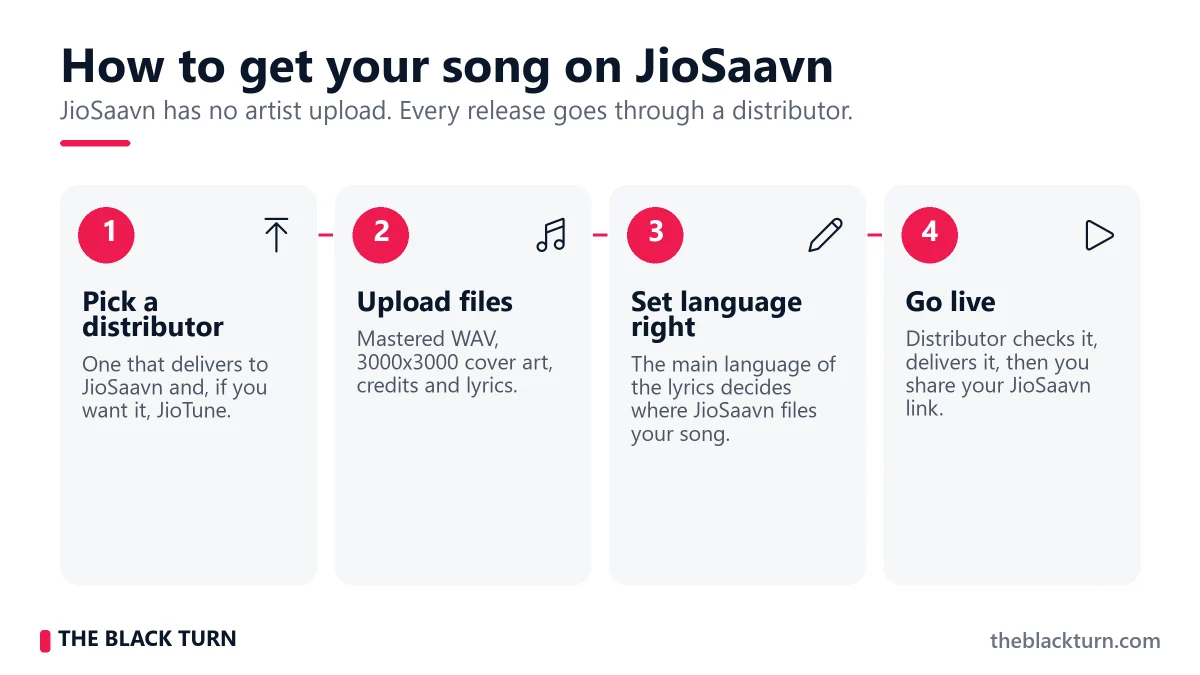
By following the below given steps you can get your songs on JioSaavn:
Step 1: Choose a Distributor That Supports JioSaavn + Caller Tune
This is your most important decision. Most distributors deliver to JioSaavn, but far fewer handle JioTune (caller tune) delivery. Choose one that offers both. The Black Turn’s music distribution service includes JioSaavn delivery, caller tunes, free YouTube Content ID, free ISRC and UPC, and 150+ stores. See the plans on our pricing page.
When evaluating distributors for JioSaavn specifically, check for:
- JioSaavn delivery confirmed : Check the store list before paying
- JioTune (CRBT) support : Extra revenue that most global distributors do not offer
- Fast delivery : At The Black Turn, approval is within 24 hours and releases go live on most stores in 1–3 days
- ISRC code included : Free ISRC code for every release
- Royalty terms : What share you keep, and whether your song stays live if you stop paying
Step 2: Create Your Account and Prepare Files
Register on your distributor’s platform. You will need your email, phone number, bank account details (for royalty payments), PAN card, and KYC documents if required.
Before starting the upload, have these files ready on your computer:
- WAV audio file (mastered, final version)
- Cover artwork (3000×3000 JPG/PNG)
- Metadata document with all credits and details written out
- Lyrics file (if you want lyrics shown on JioSaavn)
Step 3: Start a New Release
Log into your distributor’s dashboard and click “New Release” or “Upload”. Select your release type:
- Single : 1 song (best for new artists and regular releases)
- EP : usually 2–6 songs
- Album : usually 7+ songs
Step 4: Upload Audio and Artwork
Upload your WAV file first. Wait for it to finish completely, do not close the browser tab. Then upload your cover artwork. Preview how it looks on the distributor’s platform to catch any cropping or quality issues.
Step 5: Fill in Metadata with Extra Attention to Language
This is where JioSaavn-specific care is needed. Fill in every field:
- Song Title : Double-check spelling. If your title uses Hindi words in English script, be consistent.
- Artist Name : Must match your other releases exactly.
- Language : Select the PRIMARY language of the lyrics. If your song is Punjabi with some Hindi words, select Punjabi. This decides where JioSaavn files your song.
- Genre : Choose the most accurate genre, such as Bollywood, Devotional, Indie Pop or Sufi, if they fit.
- Release Date : Set 2–3 weeks in the future so you can claim your profile and pitch to JioSaavn editors.
- Composer, Lyricist, Music Producer : Get them right; they show on the song credits.
- Explicit Content : Mark appropriately if your song contains profanity.
Step 6: Select All Platforms Including Caller Tune
Select “All Platforms” for maximum reach. Your song will go to JioSaavn, Spotify, Apple Music, Gaana, YouTube Music, Amazon Music and the rest of your distributor’s store list at the same time.
If your distributor offers caller tune (CRBT) distribution, enable it and pick the clip from your song you want callers to hear: the chorus, the hook, or the most memorable line. That clip becomes your JioTune (and your Airtel, Vi and BSNL caller tune, if your plan covers them).
Step 7: Submit Lyrics (If Supported)
If your distributor supports lyrics submission, upload your lyrics during the release process. Fans who can read along tend to stay with a song longer and come back to it.
Step 8: Review, Pay, and Submit
Review every detail one final time. Check for typos, wrong language selection, missing credits, and artwork issues. Complete your payment and submit. Your distributor will then review the release; at The Black Turn this approval happens within 24 hours.
Step 9: Approval and Going Live on JioSaavn
After approval, your distributor delivers the song to JioSaavn and other stores. With The Black Turn, releases go live on most stores in 1–3 days; exact timing on each store can vary. Once live, your song is searchable on JioSaavn by your artist name and song title.
Caller tunes take longer than streaming because each telecom operator reviews them separately. Your distributor will confirm when the JioTune is active and share the song code. (For an already-released song, The Black Turn’s ₹499 caller tune service goes live in 1–3 weeks.)
How Indian Record Labels Distribute Music to JioSaavn, Spotify and Gaana
Labels use the same pipe as independent artists, just at a bigger scale. Large labels often have direct licensing deals with JioSaavn, Spotify and Gaana. Small and mid-size labels usually work through a distributor or aggregator, which delivers the whole catalogue, assigns ISRC and UPC codes, collects royalties from each store, and sends one combined statement. Labels then split that money with their artists as per their contracts.
If you are starting a small label, a label plan saves you from paying per song. The Black Turn’s custom label plan is ₹4,999/year for unlimited releases under your own label name, with the same 95% royalty share.
How to Claim Your JioSaavn for Artists Profile
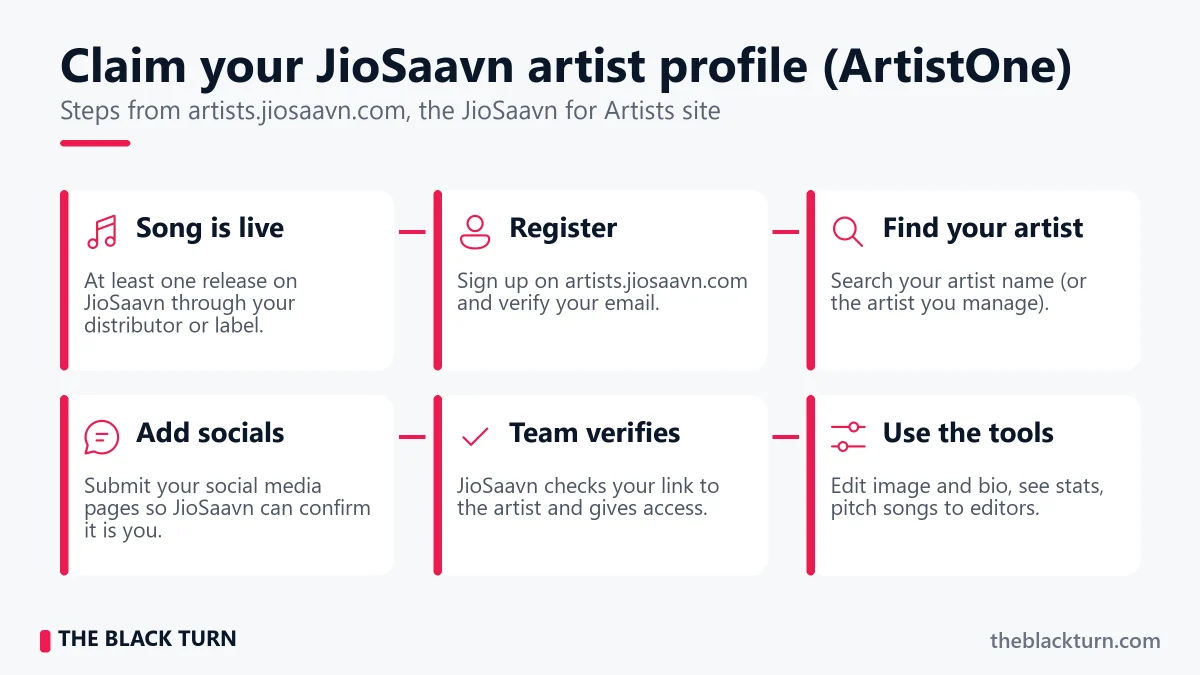
JioSaavn’s artist platform is called ArtistOne, at artists.jiosaavn.com. It works like Spotify for Artists: once verified, you control your artist page and see your data. Here is the process as JioSaavn describes it:
- Get your music live first – You need at least one release on JioSaavn through your distributor or label.
- Register on ArtistOne – Click “Register”, fill in your details and verify your email address.
- Search for your artist profile – Search your own artist name, or the artist you manage.
- Submit your social media pages – JioSaavn uses these to check that you really are (or represent) that artist.
- Wait for verification – JioSaavn’s team verifies your connection to the artist and then gives you access.
With a verified JioSaavn artist profile, you can:
- Update your artist image and bio : Make your page look professional
- View streaming analytics : Streams, top tracks, and audience age, gender, city and country
- Pitch songs to JioSaavn editors : Submit upcoming releases for playlist consideration and track editorial playlist performance
- Create “Made By” playlists and Shorties : Your own curated playlists and short looping videos on your songs
Tip: Use exactly the same artist name on every release. If two spellings exist, JioSaavn may create two artist pages, and you will end up claiming (and promoting) them separately.
JioSaavn + JioTune: The Revenue Combination
This is where JioSaavn stands out for Indian artists. One release can earn from JioSaavn streams and from JioTunes set by Jio users.
How It Works
- Your song goes live on JioSaavn through your distributor.
- Your caller tune clip is delivered to Jio for JioTunes.
- Jio users find your song in the JioSaavn app (JioTunes section → search → preview → Set JioTune), in the MyJio app, or by dialling 56789, as explained on jio.com.
- When a user sets your song as their JioTune, everyone who calls them hears your music.
- You earn from JioSaavn streams and from caller tune usage, both paid through your distributor.
How Caller Tune Revenue Is Paid
Caller tune money does not work like a fixed price per download. Jio reports usage to your distributor, the distributor’s statement shows what your song earned, and you get your share. The amount depends on how many people set your tune and for how long, and Jio does not publish a per-tune rate, so be wary of anyone quoting a fixed rupee figure.
The real value of caller tunes is that they are passive. Once someone sets your song, every incoming call plays it to a new person, without you doing anything. For Airtel users, the equivalent is Airtel Hellotunes, set from the Airtel Thanks app. Share our Airtel Hello Tune guide with fans on Airtel.
How Much Does JioSaavn Pay Indian Artists?
JioSaavn does not publish a fixed per-stream rate, and no honest distributor can promise one. Like other streaming services, it pays from a revenue pool, so the value of a stream depends on:
- Free vs Pro listener : streams by paying JioSaavn Pro users are usually worth more than ad-supported streams
- Country : a stream from the USA or Canada can pay differently from a stream in India
- Month : the total pool and total streams change every month
- Your distributor’s cut : what share of the store payout reaches you
The simple way to know your own rate: take the JioSaavn earnings from your distributor statement and divide by the JioSaavn streams for the same period. Multiply by 1,000 to get your earning per 1,000 streams. After two or three statements you will have a realistic number for your genre and audience.
With The Black Turn, you keep 95% of your royalty for life, paid quarterly, and earnings keep coming even if you do not renew. Remember that JioSaavn is only one store: the same release also earns on Spotify, Apple Music, Gaana, YouTube Music, Amazon Music and others.
How to Get Your Song on JioSaavn Playlists
Playlists drive a large share of streams on JioSaavn, just like on Spotify. Here is how to increase your chances of getting playlisted:
1. Release Consistently
Editors and the algorithm both notice artists who release regularly. A single every 4–6 weeks keeps you on their radar.
2. Get Your Metadata Right
Correct language, genre, and credits help JioSaavn’s recommendation engine categorise your music properly. If your song is tagged as the wrong language, it will never appear in the right playlists.
3. Promote Outside JioSaavn to Drive Streams In
Share your JioSaavn link on social media, WhatsApp, and YouTube. Early streams and saves on a new song show both the algorithm and the editors that people want it. This is the same principle that works on Spotify.
4. Pitch Through ArtistOne
Once your profile is verified on ArtistOne, use its pitching tool to send upcoming songs to JioSaavn’s editors. Pitch before the release date, which is another reason to schedule releases 2–3 weeks ahead.
5. Engage Your Regional Audience
JioSaavn’s regional playlists are less crowded than Hindi pop or Bollywood playlists. If you create content in a regional language, focus on getting featured in those language-specific playlists first. Building a regional base often leads to broader discovery.
How to Promote Your Song on JioSaavn
By using the below mentioned ways you can promote your song on JioSaavn for free.
Share Your JioSaavn Link Specifically
When promoting on social media, do not always default to Spotify. Many Indian listeners, especially in Tier 2 and Tier 3 cities, use JioSaavn as their main streaming app. Create posts and stories that link directly to your JioSaavn page. Use a smart link tool to let listeners choose their preferred platform.
Use WhatsApp for Regional Promotion
WhatsApp is how most Indians share things directly. Share your JioSaavn link with relevant WhatsApp groups, your status, and broadcast lists. For regional content, WhatsApp groups organised by language and region are goldmines for targeted promotion.
Create YouTube Content That Drives JioSaavn Streams
Post a lyric video, audio visualiser, or behind-the-scenes video on YouTube with a link to your JioSaavn page in the description. YouTube viewers who discover your music often move to streaming apps for repeat listening.
Encourage Caller Tune Sets
Actively promote your JioTune. Post a short reel showing the steps: open JioSaavn, tap JioTunes, search your song, tap Set JioTune. Share the song code your distributor gives you. When fans set your song as their caller tune, every incoming call becomes free promotion to new listeners.
JioSaavn vs Spotify: Should Indian Artists Focus on Both?
This is a question many Indian artists debate. The answer is straightforward: distribute to both, but understand their different strengths.
| Factor | JioSaavn | Spotify |
| Audience | India-focused, strong in regional languages | Global platform with a growing Indian base |
| Regional Content | Strong regional curation | Improving but Bollywood-heavy |
| Caller Tune | Set JioTune from inside the app | No caller tune |
| Artist Tools | ArtistOne: stats, bio, editorial pitching | Spotify for Artists: stats, bio, editorial pitching |
| Editorial Playlists | Less competitive (Indian focus) | Highly competitive (global) |
| Algorithmic Discovery | Good for Indian content | Strong Discover Weekly, Release Radar |
| International Reach | India plus diaspora (app serves the US and Canada) | Global, 180+ countries |
The smart strategy is to distribute to all platforms at once. One upload through your distributor gets you on JioSaavn, Spotify and Gaana plus 150+ other stores. There is no reason to choose one over the other, and the same logic applies to the JioSaavn vs Gaana question.
Common Mistakes to Avoid on JioSaavn
1. Wrong Language Selection
Selecting Hindi for a Punjabi song, or English for a Hinglish track, misplaces your song in JioSaavn’s catalogue. Your target audience will not find you. This is the single biggest JioSaavn-specific mistake.
2. Ignoring JioTune
Many artists distribute to JioSaavn but skip caller tune distribution. This leaves revenue and free exposure on the table. If your song has a strong hook, opt for CRBT.
3. Never Claiming the Artist Profile
Without ArtistOne you cannot see who is listening, fix your photo and bio, or pitch to editors. Claim it as soon as your first song is live.
4. Only Promoting Spotify Links
Many Indian artists only share Spotify links on social media, ignoring their JioSaavn audience. A large portion of Indian listeners, especially outside metros, use JioSaavn as their main app. Share JioSaavn links alongside Spotify.
5. Choosing a Distributor Without Indian Caller Tune Support
International distributors deliver to JioSaavn but generally not to Indian caller tune services. Before signing up, confirm that your distributor delivers to JioSaavn and Gaana and supports JioTunes.
6. Inconsistent Release Schedule
JioSaavn’s algorithm and editorial team favour artists who release consistently. One song per year will not build momentum. Aim for at least one release every 4–6 weeks to stay visible.
Frequently Asked Questions
Here are the questions people frequently ask about how to get a song on JioSaavn.
Can I upload my song directly to JioSaavn?
No. JioSaavn’s artist site says it does not let artists upload content on the platform. You need a label or a music distribution company to deliver your music to JioSaavn. The distributor handles the technical delivery, metadata, and royalty collection on your behalf.
How can I upload songs on JioSaavn for free?
There is no free direct upload. Some distributors charge nothing upfront but keep a percentage of your royalties, and many do not include caller tunes. Paid distributors charge a fee but let you keep more. At The Black Turn, a single costs ₹599 one-time (₹799 with caller tunes) and you keep 95% of royalties for life. Compare the total cost over a few years, not just the upfront price.
How long does it take for a song to go live on JioSaavn?
It depends on your distributor and on the store. With The Black Turn, releases are approved within 24 hours and go live on most stores in 1–3 days. Caller tunes take longer because telecom operators review them separately.
How much does JioSaavn pay per stream in India?
JioSaavn does not publish a fixed rate. Your earning per stream depends on whether the listener is free or Pro, their country, that month’s revenue pool, and your distributor’s cut. Divide your JioSaavn earnings by your JioSaavn streams on your distributor statement to find your real rate.
Is JioSaavn available in the USA?
Yes. The JioSaavn app is on the US App Store, and its listing says content is served in the United States and Canada (its English catalogue is currently India-only). Your Indian-language songs delivered by a distributor can be streamed there, and US streams show up in your royalty report.
Is Saavn the same as JioSaavn?
Yes. Saavn became JioSaavn under Reliance Jio. Distributing to “Saavn” and to JioSaavn is the same thing.
Is JioSaavn distribution free?
JioSaavn itself does not charge artists. You pay your distributor (a fee, a royalty cut, or both), and that covers delivery to JioSaavn along with other stores.
Can I get a caller tune through JioSaavn?
Yes. Jio users can set JioTunes inside the JioSaavn app. For your song to be available, your distributor must deliver it with the caller tune option. Your distributor needs to support caller tune distribution for this feature.
How do I claim my artist profile on JioSaavn?
Once your song is live, register on ArtistOne at artists.jiosaavn.com, verify your email, search for your artist name and submit your social media pages. JioSaavn’s team verifies your connection to the artist and then gives you access to your bio, image, analytics and editorial pitching.
Should I release on JioSaavn or Gaana?
Both. A distributor delivers to JioSaavn and Gaana in the same release at no extra effort, and their audiences overlap only partly. JioSaavn’s extra plus for artists is the in-app JioTune option and the ArtistOne dashboard.
Can I distribute a cover song to JioSaavn?
Only with permission (a licence) from the owner of the original song. Uploading a cover without proper licensing can lead to a takedown and legal trouble. Always make sure you have the rights before distributing.
What happens if my song is rejected by JioSaavn?
Your distributor will notify you with the reason for rejection. Common reasons include poor audio quality, incorrect metadata, artwork violations, or copyright issues. Fix the problem and resubmit through your distributor.
Does JioSaavn support lyrics display?
Yes, JioSaavn shows lyrics on many songs. If your distributor supports lyrics submission, submit your lyrics during the upload process.
Can I remove my song from JioSaavn after distribution?
Yes. You can request a takedown through your distributor. Timing varies by store. Once removed, the song’s page and its playlist placements are gone, so think before you take down a song that is still earning.
Get Your Music on JioSaavn Today
JioSaavn is a key platform for Indian artists targeting audiences at home and in the diaspora. With in-app JioTunes, strong regional curation, and the ArtistOne dashboard for stats and editorial pitching, it offers a mix of reach, revenue and discovery that matters for Indian-language music.
Ready to get started? Distribute your music with The Black Turn and get your song on JioSaavn, Spotify, Apple Music, Gaana, YouTube Music and 150+ stores, with caller tunes on Jio, Airtel, Vi and BSNL. One-time payment, 95% lifetime royalty paid quarterly, free ISRC and UPC, and call and WhatsApp support.
Your audience is already on JioSaavn. Your song should be too.
 Jyoti Singh – Independent artist (32) who has worked at several music distribution companies and has released music through distributors – so these guides come from both sides of a release.